✦ DUAL BAY · OFFLINE CLONE · 2×16TB · UASP ✦WAVLINKUSB 3.0 Dual Bay SATA HDD/SSD Docking Station · Clone ToolTwo Drives. One Button.
Offline Clone Perfected.
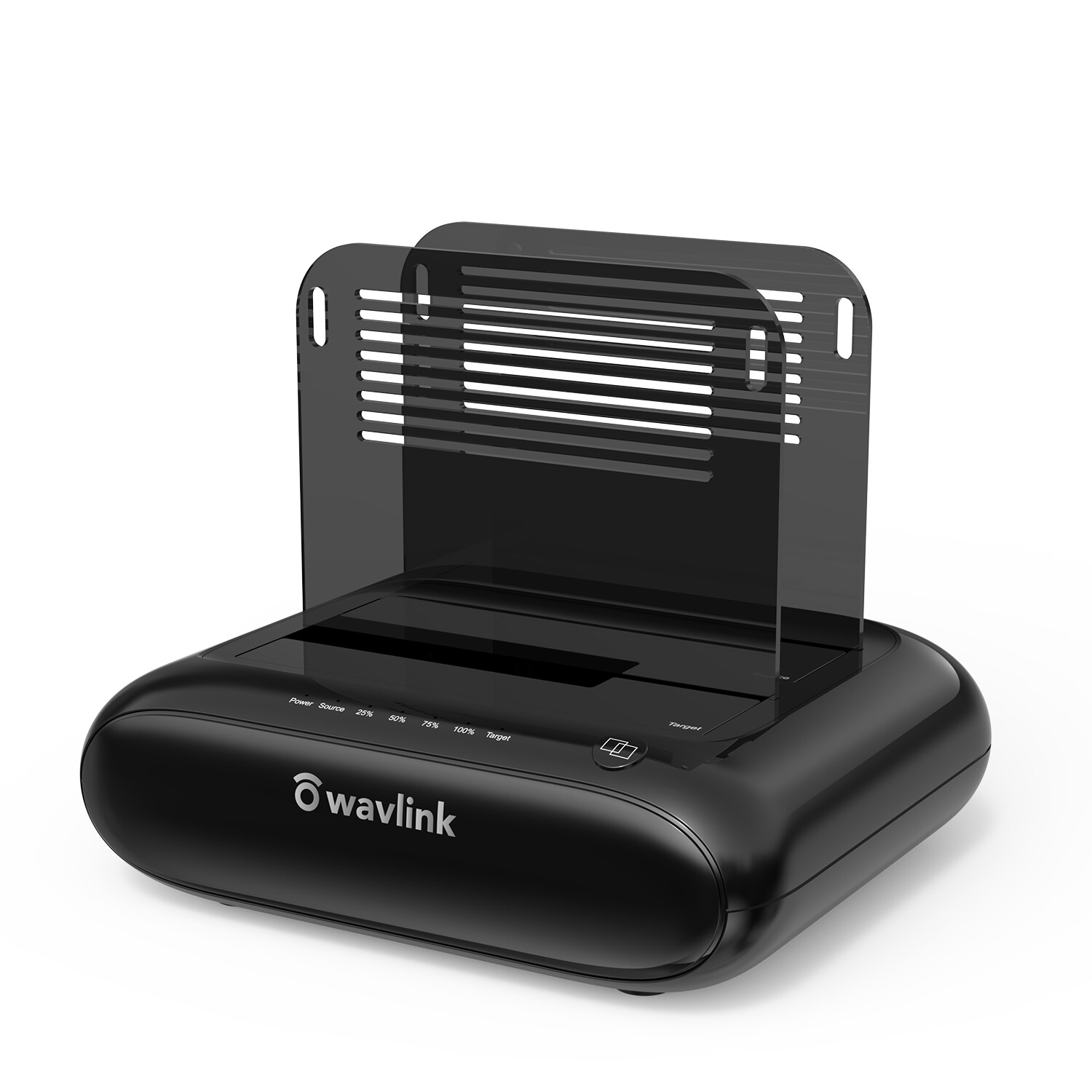
The WAVLINK SATA Hard Drive Cloner supports data copy and clone between any two 2.5" and 3.5" SATA I/II/III HDD and SSD up to 16TB capacity. Adopts USB 3.0 (SuperSpeed) with data transfer rate up to 5Gbps and UASP protocol — backward compatible with USB 2.0/1.1. Perfect for film & TV production, IT backup, and batch data processing.
2×16TBMax Capacity5GbpsUSB 3.0UASPProtocol1-ButtonOffline CloneProduct OverviewA Perfect Data Access & Hard Drive Clone Tool. Wavlink SATA Hard Drive Cloner supports data copy and clone between any two 2.5" and 3.5" SATA I/II/III HDD and SSD up to 16TB capacity. Moreover, it adopts USB 3.0 (SuperSpeed) with data transfer rate up to 5Gbps and UASP protocol. It is also backward compatible USB 2.0/1.1. This excellent transmission performance and compatibility is convenient for data exchange and perfectly suitable for people who need to process clone data regularly — such as film and television production, backup & processing IT data, and schools batch processing data.
SATA Interface Only: Not compatible with HDD/SSD featuring an IDE interface. Please confirm your hard drive type before purchasing.
For Your Smartphones: Compatible with your USB-C Android phones — data transfer by OTG. (The USB-A to USB-C converter is included.)
Dual Bay ArchitectureSource + Target. Both Up to 16TB.
Two independent SATA bays accept 2.5" or 3.5" SATA I/II/III HDD and SSD simultaneously. One drive reads, the other writes — no computer required for offline clone.
Bay A · Source16TB maxThe drive whose data you want to copy or clone from.2.5" / 3.5"SATA I/II/IIIHDD / SSDBay B · Target16TB maxThe drive that will receive an exact mirror of the source.2.5" / 3.5"SATA I/II/IIIHDD / SSDOffline CloneOne Button. No Computer Needed.
Simply insert the source and target drives, press the Clone button, and the docking station handles the rest — partition, format, and data are copied exactly. No computer, no software, no driver.
Clone WorkflowPress · Copy · Done💾Source DriveInserted into Bay A▶🔘Press CloneOne-button operation▶💿Target DriveExact mirror in Bay B
Before You Clone: ① The target drive must be at least equal or larger in capacity than the source drive. ② Confirm both drives work properly and the target drive has no existing data — cloning will erase everything on the target. ③ To avoid data loss, do not unplug drives while a drive is working in the docking station. Power off the dock before removing. ④ Make sure there is no connection to the USB port when performing offline clone.
Core CapabilitiesBuilt for Regular Large-Volume Data Work.⚡USB 3.0 SuperSpeed · 5Gbps · UASP
Adopts USB 3.0 (SuperSpeed) with data transfer rate up to 5Gbps and UASP protocol. Backward compatible with USB 2.0/1.1 — excellent transmission performance for frequent large-file data exchange.
💾Dual Bay · Up to 32TB Total
Supports data copy and clone between any two 2.5" and 3.5" SATA I/II/III HDD and SSD up to 16TB capacity each — 32TB combined. Full compatibility across the entire SATA generation range.
🔘One-Button Offline Clone
One button to offline clone — does not need to connect to the computer. Perfect for film & television production, backup & processing IT data, and schools batch processing data.
🌙Auto-Sleep Function
After finishing cloning, the product will go to sleep mode if there are no operations for about 12 minutes and HDDs stop running. Saves power, extends drive lifespan, reduces noise.
🔌Sufficient Power Supply
A highly efficient 12V/3A power supply provides a stable and reliable energy supply which can easily drive large capacity hard drives. Some disks need more wattage to start up — the included adapter ensures stable power for transmission.
📱OTG Smartphone Compatible
Compatible with your USB-C Android phones — data transfer by OTG. The USB-A to USB-C converter is included. Making sure your smartphone supports OTG function or data will not be transmitted.
💽One-Touch Backup (Windows)
One-Touch Backup function for Windows PC ONLY. A dedicated backup button mirrors the source drive to a folder on the target — a quick, repeatable way to keep critical data safe.
🛡️Safe Hot-Swap Design
Removable bezels keep dust out and give the dock a clean finish. Before removal, stop all data access and transfer. Never remove a hard drive while it's in use — this can corrupt data or damage the drive, dock, or computer.
Tech DataSpecificationCompatible HDD2.5" / 3.5" SATA I/II/III HDD & SSDMax HDD Capacity2 × 16TB (32TB total)Maximum Data Transfer Rate5Gbps USB 3.0 SuperSpeedProtocol SupportUASP · Backward compatible USB 2.0 / 1.1MaterialPlastic ABS and PCWeight (with 2 bezels)366g / 12.9oz / 0.8lbsItem Dimensions14.2 × 12 × 4.5cm / 5.6 × 4.7 × 1.8inUSB-B to USB-A Cable2.3ft / 27.56inch / 70cmPower Cable120cm / 47.2in / 3.93ftPower Adapter12V / 3A — high-efficiency stable power supplyAuto-SleepAfter ~12 minutes of no operationBefore You BuyTips & Important NotesPlease read before use
- ·Do not support M1 based Mac.
- ·One-Touch Backup function for Windows PC ONLY.
- ·One button to offline clone, does not need to connect to the computer.
- ·Please make sure the actual capacity of the Target disk is higher than the Source disk (Target ≥ Source).
- ·Making sure your smartphone supports OTG function or data will not be transmitted.
- ·A brand-new hard drive should be formatted and partitioned in Disk Management / Disk Utility before use.
- ·To avoid data loss, please do not try to insert or withdraw HDD or SSD when another hard drive is running.
- ·Please backup files in the target hard drive before cloning. Any files in the target hard drive will be overwritten when offline cloning occurs.
- ·Some disks might need more wattage than a normal disk to start up — please connect the 12V power adapter to ensure a stable power supply for transmission.
After Transferring Data on Computer: ① Before removal, please stop all data access and transfer to the device. ② Never remove your hard drive(s) or insert a new one while the hard drive is in use — otherwise, you may corrupt the data or damage the hard drive, docking station, or computer.
What You GetPackage Includes💾USB 3.0 Dual Bay Hard Drive Docking StationMain unit · 2.5"/3.5" SATA🔗USB 3.0 Type-B to Type-A Cable70cm / 27.56in🔄USB 3.0 Type-A to Type-C AdapterFor USB-C hosts & OTG phones⚡12V / 3A Power AdapterStable power supply for large drives🛡️2 × Bezels + Several ScrewsDust protection & drive mounting📖User ManualSetup and cloning guideWAVLINKDual Bay · SATA I/II/III · 2×16TB · UASP 5Gbps · Offline CloneTwo Drives. One Button. Zero Data Loss.
The perfect data access and hard drive clone tool for film production, IT backup, and batch data processing — with no computer required for offline clone.
Dual Bay · 2×16TB2.5" and 3.5" SATA I/II/III HDD & SSD — 32TB combined capacity.USB 3.0 · 5Gbps · UASPSuperSpeed transmission with UASP acceleration, backward compatible USB 2.0/1.1.One-Button Offline CloneClone drive-to-drive without a computer — partition, format, and data mirrored exactly.Auto-Sleep + 12V/3A Power12-minute auto-sleep after idle. Stable 12V/3A supply drives large-capacity drives reliably. SATA interface only — not compatible with IDE interface HDD/SSD. Please confirm your hard drive type before purchasing.
Not supported with M1 based Mac. One-Touch Backup function for Windows PC ONLY. Offline clone works without a computer.
Before cloning: Target ≥ Source capacity; target drive must have no data (all existing data will be overwritten).
A brand-new hard drive should be formatted and partitioned in Disk Management / Disk Utility before use.
Never remove a hard drive while it is in use — power off the dock before removing to avoid data corruption or hardware damage.