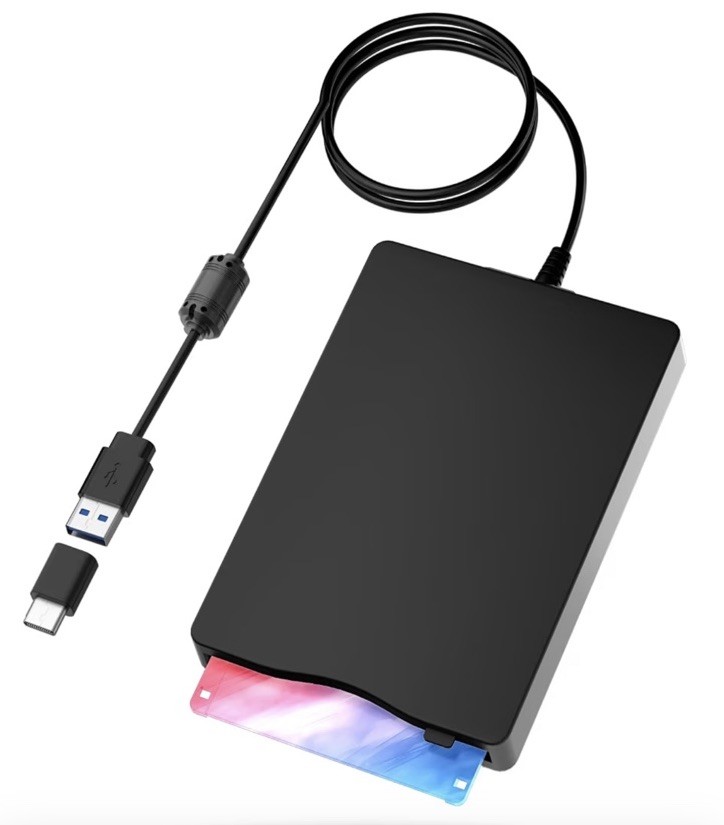
This sale is for a new in box Floppy Disk Reader,External Floppy Drive, 3.5" USB &Type C Floppy Disk Reader Portable 1.44 MB FDD for PC, Laptop and Desktop Compatible with Windows 2000/XP/Vista/7/8/10/11. Please see the photos and message me with any questions. Below is additional information from the manufacturer:
• (USB Floppy Disk Drive) :This 3.5-inch USB
external floppy disk reader is designed to read 3.5-inch floppy disks with a capacity of 1.44MB. It's a perfect solution for those who need to access old files stored on floppy disks but don't have an internal floppy disk drive
• [Wide Compatibility ) :This external floppy disk drive is designed to provide wide applicability, allowing users to revive the usability of old floppy disks. It is compatible with both desktops and laptops, making it a versatile option. Furthermore, it supports various operating systems, including Windows 2000, XP, Vista, 7, 8, 10, and 11. This broad compatibility ensures that users can easily access or retrieve data from their old floppy disks without having to replace their current system.
Whether you have important files stored on older floppy disks or simply want to revisit nostalgic memories, external floppy disk drive is an excellent choice
• [Plug and Play ) : Yaeonku Floppy Disk Reader lets you access your old floppy disks with ease. With no extra driver required, simply insert your floppy diskette into the drive and plug the USB connector into your computer. Your computer will automatically detect the drive, and you'll be able to start using it right away. Once connected, simply open up "Windows File Explorer" and you'll see the drive A icon under "Devices and Drives". Right-click on it and select the open option, enabling you to cut, paste, or copy files from your floppy disks just like any other system files
Reliable Performance: Crafted from premium materials, this intelligent device boasts exceptional shockproof capabilities, minimal noise generation, and remarkable fault tolerance. Its low impedance and impressive anti-interference capability ensure a seamless and rapid user experience. Immerse yourself in the nostalgic sound of reading floppy disks, transporting you to a bygone era and evoking cherished memories
(43)