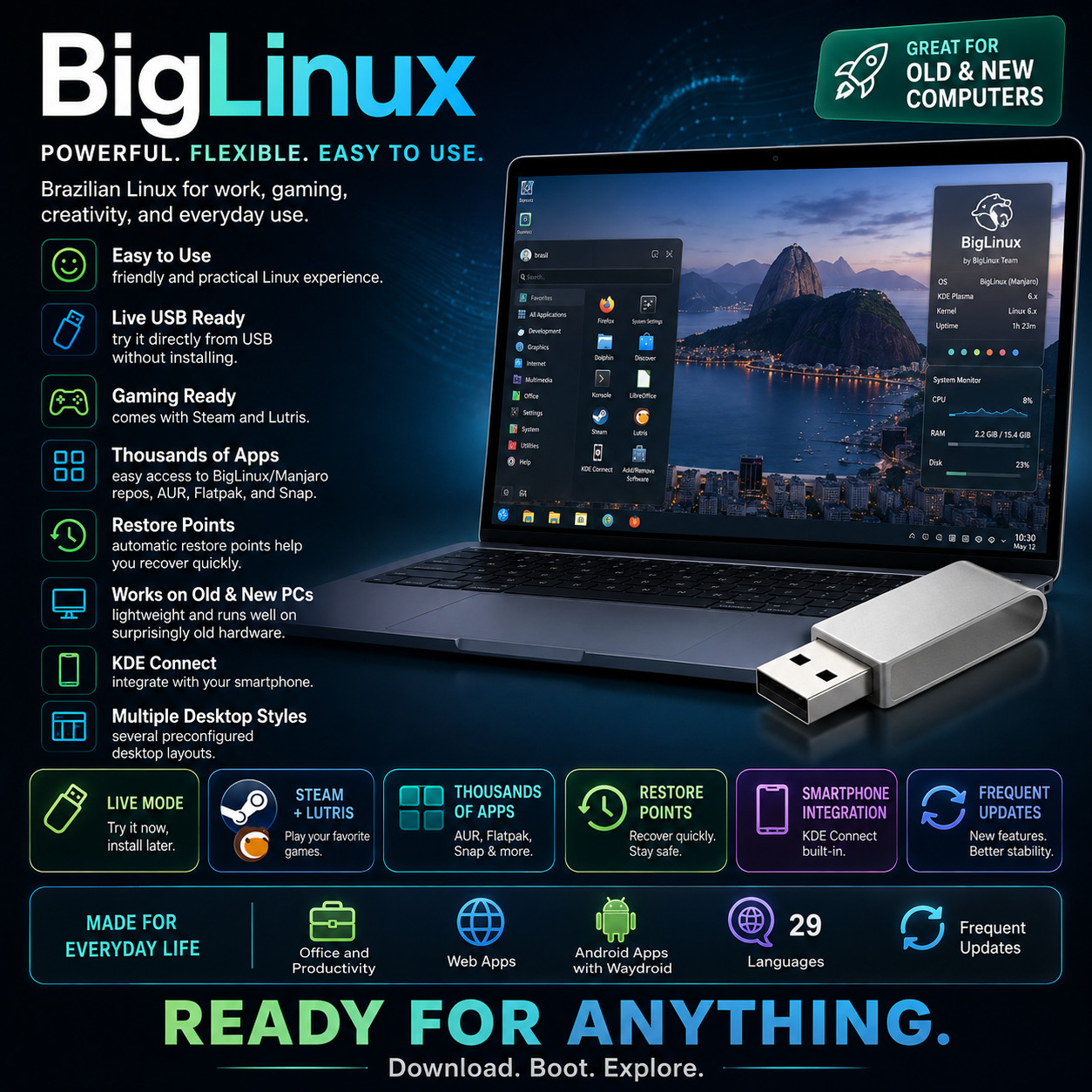
Brazilian Linux Desktop BigLinux POWERFUL · FLEXIBLE · EASY TO USE A desktop that arrives finished — office, games, media and phone all set up before you start. Live Try & Full Installer Gaming Ready Automatic Restore Points 29 Languages Try It Without Changing Anything Boot the USB and the complete desktop runs from the drive — browse the web, open the office suite, check your wifi and graphics behave. Nothing on your hard drive is touched until you decide to install. Pull the USB out and your computer starts up exactly as it did before.
BigLinux is a Brazilian desktop operating system that has been refined for more than twenty years around one idea: the system should already be set up when you get there. Rather than handing you a bare desktop and a list of things to install, it arrives with the office suite, the web browser, the media tools, the game launchers and the phone integration configured and working. It is built on the Manjaro package base, wrapped in the KDE Plasma desktop, and finished with a set of BigLinux tools that handle the fiddly jobs — restore points, format conversion, driver choice — through a right-click or a couple of clicks. This prepared USB lets you boot it and try the whole thing before you commit anything to disk.
Why This Edition Stands Out 💾 Plug-in-and-boot ready USB Written, tested and verified before shipping. The image is over 5 GB — too large for any disc — so a prepared USB saves you a long download and the flashing software that goes with it. 🔍 Try it before you commit The live session runs the complete desktop from the USB, which is exactly how the project recommends you check that your graphics, wifi and sound work on that specific machine first. 🎁 Finished, not assembled Office suite, browser, media players, game launchers, phone integration and remote access are installed and configured on arrival. There is no evening of setup between you and a working computer. 🎛️ Prepared with the recommended build The project publishes builds with different kernel and graphics-driver versions. Yours is written with the one they recommend for the widest range of computers — message us before ordering if you need one of the others. 📚 Step-by-step PDF setup guide A screenshot-driven "Read Me First" guide ships on the drive — boot-menu keys for major laptop brands, turning off Secure Boot, the live session, and the install walked through screen by screen. 🚀 Always the latest stable release The project publishes new builds constantly, and the media is rebuilt as they ship — you receive a current build at order time, not a years-old archive. What you get on the desktop 🖥️ A full desktop, in six ready-made layouts The KDE Plasma desktop is one of the most configurable there is, which is wonderful and slightly overwhelming. BigLinux answers that with six preconfigured layouts — pick the one that feels closest to what you are used to and start working, or rearrange every panel and widget yourself if that is your idea of a good evening. 🎮 Set up for gaming out of the box The two main game launchers are installed and configured on arrival, along with the graphics stack and compatibility layers that make PC games run on Linux. Buying a distribution that has already done that work is the difference between playing this evening and spending it reading forum threads about drivers. 📦 Thousands of applications, from every direction A software centre reaches the BigLinux and Manjaro repositories, the community archive, and the two big universal package formats — so almost anything you go looking for is there. It also handles portable application images, converts packages built for other Linux families so they install anyway, and comes with Java ready for programs that need it. ⏱️ Automatic restore points The system takes its own snapshots and keeps them for five days. If an update or an experiment leaves things worse than it found them, a few clicks put the system back the way it was — which is the safety net that makes a rolling-release system comfortable to live with rather than nerve-racking. 📱 Your phone and your computer, joined up Phone integration is built in: use the handset as a wireless mouse and keyboard, copy text on one device and paste it on the other, send files back and forth, and see your notifications on the desktop. Remote access is set up too, so you can reach the computer from another machine or from the phone while you are out. Android applications can be run on the desktop through a simplified installer. 🧰 The everyday jobs, on a right-click Convert a video, audio file, image or document. Resize a picture, rotate or mirror it, make an animated GIF, add a border. Pull the text out of an image, run text recognition over a scanned PDF so it becomes searchable, or edit a file's metadata. Right-click the file, choose what you want, and it happens — no hunting for a tool first. Plus more inside 📄 A complete office suite, ready configured Documents, spreadsheets and presentations with spell checking, opening and saving the common formats people send you — installed and set up rather than left as an exercise. 🎙️ Noise filtering for calls A microphone filter strips out the background — passing traffic, a barking dog, the hum of the room — so people on the other end of a video call hear you rather than your house. 🗜️ Files compressed automatically Everything on the disk is transparently compressed in a modern, fast format. You use your files completely normally and simply get noticeably more room on the drive for them. 🌐 Websites that behave like apps Dozens of ready-made web applications take almost no disk space, and you can turn any site you rely on into one that opens in its own window from the menu. 🔄 Updates without reinstalling New versions arrive continuously as ordinary updates. There is no reinstall day and no jumping between major releases — the system you install keeps becoming the current one. 🌍 29 languages Translations for the major world languages are included — choose yours during setup and the desktop follows. 🛟 Doubles as a rescue system Because the live session is a full working desktop, it is a practical way to pull files off a computer whose own system has stopped starting. 🔑 No product key, no activation Nothing to type in, no account required before your own computer will let you work, and no limit on how many of your machines you install it on. Who it's for 🎮 Gamers moving to Linux The launchers, drivers and compatibility layers are already in place, which removes the single biggest obstacle people hit when they try to make the switch. 🏠 Everyday home computing Browsing, email, documents, photos, music, video calls and a phone that talks to the computer — all working from the first boot without a shopping list of things to install. 🎨 Tinkering & making A vast software catalogue, painless format conversion, Android applications on the desktop, and restore points that make experimenting safe rather than risky. 💻 Perfectly good older PCs A 64-bit machine from the last decade and a half, slowed to a crawl by the system it came with, is usually fine hardware asked to do the wrong job. What you receive in the mail
1 × USB flash drive preloaded with the current BigLinux — bootable as a live session you can try and as a full installer - Written with the recommended build — the kernel and graphics-driver combination the project recommends for the widest range of computers. Message us before ordering if your machine needs the older-hardware build or the newest-hardware one instead.
- Step-by-step setup guide with screenshots — open the "Read Me First" PDF on the drive
- Quick reference card — boot-menu keys for major laptop brands, how to turn off Secure Boot, and a one-page tour of the desktop
Why USB and not a disc: the BigLinux image is over 5 GB. That is larger than a standard DVD holds and many times larger than a CD, so this system is supplied on a USB flash drive — which is also what the project itself recommends. Compatibility Requirement Supported Processor 64-bit Intel or AMD, or compatible. Memory 2 GB of RAM minimum; 4 GB or more recommended for comfortable everyday use Storage 8 GB minimum for an installation; 40 GB or more recommended, particularly if you intend to install games. Nothing is written to your disk if you only run the live session. Graphics Drivers are built into the system. Builds with different driver versions are published for older and for very new hardware — the live session is how you confirm which suits your machine. Boot mode Secure Boot must be turned off in your firmware settings before booting. The included guide shows where to find that setting. Internet Not needed to boot the live session. Recommended during and after installation for updates and for installing further software. Drive A USB port. The image is over 5 GB, so it is supplied on USB rather than on any disc. How it works (3 steps) 1 Plug in & boot Turn off Secure Boot, insert the USB, restart, and pick it from the boot menu. The included PDF covers both, brand by brand. 2 Try the live desktop The full desktop runs from the USB. Check your graphics, wifi, sound and touchpad on that exact computer — nothing on your hard drive changes. 3 Install it if you like it Run the installer from the live desktop — alongside your current system or in its place — and you have a finished, configured computer. Owned, not rented No product key. No activation. No account to create before your own computer will let you work. Install it on as many machines as you like, keep using it for as long as the hardware lasts, and take the updates the project publishes at no cost — they arrive as ordinary updates rather than as a new version you have to buy or reinstall. Frequently asked questions 💾 Why is this on a USB and not a disc? The BigLinux image is over 5 GB, which is larger than a standard DVD holds and many times the size of a CD. A USB is the only sensible way to supply it, and it is what the project recommends — it also boots considerably faster than a disc would. 🛟 Will this erase the system already on my computer? Not unless you tell it to. Booting the USB and using the live desktop changes nothing on your hard drive. If you go on to install, the installer asks whether to set up alongside the existing system or take the whole disk, and says clearly which you have chosen. Back your important files up first regardless — that advice holds for installing any operating system. 💻 Will it run on my computer? If it has a 64-bit processor, at least 2 GB of memory and 8 GB of disk space, very probably — and 4 GB of memory upwards is where it becomes comfortable. There is no 32-bit build, so a genuinely ancient machine may be out of scope. The honest answer for your particular computer is to boot the live session on it and see, which is exactly what the try-first step is for. 🎮 Can I actually play games on it? The two main game launchers come installed and configured, along with the compatibility layers that let a great many PC games run on Linux. Support varies title by title — competitive games with strict anti-cheat systems are the usual exception — so check the games you care about most before switching a machine over entirely. 📄 Can I work with documents people send me? Yes — a complete office suite is installed and configured, opening and saving the common document, spreadsheet and presentation formats in circulation, with spell checking and text recognition for scanned PDFs included. 💽 Will my changes be saved if I only run it from the USB? No — the live session starts fresh each time, so anything you create or change in it is gone after a reboot. That is deliberate: it is for trying the system and for rescuing files. Install it to the computer when you want your work to stay. 🔐 Do I really have to turn off Secure Boot? Yes — the project states this plainly, and the USB will not boot until you do. It is a setting in your computer's firmware, reached by pressing a key during startup, and the included guide shows where to find it on the major brands. You can turn it back on afterwards if you decide not to install. 💻 Can I use it on more than one computer? Yes — boot it and install it on as many machines as you own. There are no activation limits of any kind. 🔑 Does it need a product key, activation, or account? No. There is no product key, no activation, and no account registration required to install or use the desktop. 🔁 Do future updates cost anything? No. The project publishes updates continuously at no cost, and they arrive as ordinary updates — you never need to reinstall to move to a newer version. 📦 We ship as soon as paid Boot it. Try it. Get on with it. A desktop that is finished before you unpack it. Have a question? Please do not hesitate to message us before purchasing.
This listing is for professionally prepared physical media. Your USB arrives preloaded with the operating system, setup guide, and quick-reference card, ready to use. You are paying for the prepared media and the sourcing, organisation, packaging, and shipping that goes into it, not for software licenses.
Condition: brand new prepared USB drive. Professionally assembled, tested, and verified before shipping.
Important notes: this is a prepared physical USB device. Includes software released under its applicable licenses, prepared and organised for ease of installation. No product keys or paid software licenses are included or required to use the software. For use on systems you own or are authorized to service. Installing an operating system can overwrite existing data — please back up anything important before you begin. The purchase price reflects the cost of the prepared media, the sourcing and organisation of the contents, packaging, and shipping, not a license to the underlying software. Only items shown or described are included.