Ergonomic Vertical | High 4000 DPI | Dual-Mode Wireless | Scroll Wheel | Long-Lasting Battery** Your Wrist, Unleash Your Productivity
In today's fast-paced digital world, is your wrist paying the price for your productivity? Supports a more natural wrist and forearm position during everyday computer use. Designed for users who demand superior comfort and precise control, we have reimagined the form and function of the wireless . This Vertical is not just a tool; it's a long-term investment in your wrist , empowering you to conquer every task comfortably and efficiently.
Core Advantages: Engineered for Performance & Well-being
- Professional-Precision Control (Up to 4000 DPI)
Equipped with a high-performance optical offering four adjustable DPI settings (1200/2400/3200/4000). Whether you're doing detailed photo editing, complex financial modeling, or creative work requiring swift perspective changes, find your perfect sensitivity for a perfect balance of pixel-perfect accuracy and lightning-fast response. - Dual-Mode Connectivity for Multi-Device Mastery
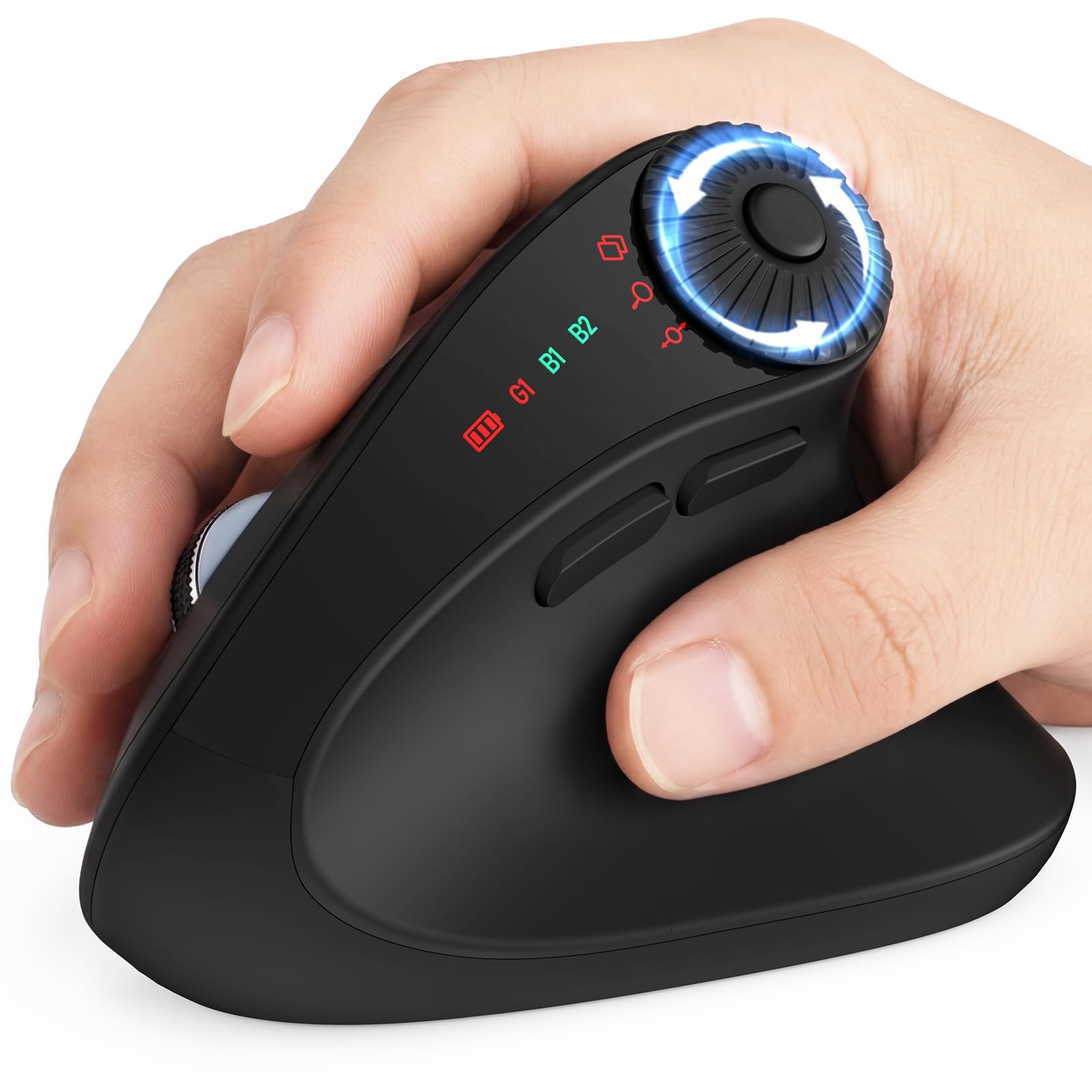
Utilize advanced 2.4GHz wireless and Bluetooth 5.0 dual-mode technology to easily connect and manage your desktop, laptop, , or TV. Seamlessly jump between devices with a simple signal switch, eliminating cable clutter and the hassle of constant plugging/unplugging for a clean, efficient workflow. - Scientific 59° Vertical Design, Contoured for Small-Medium Hands
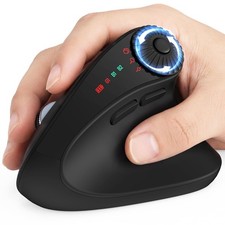
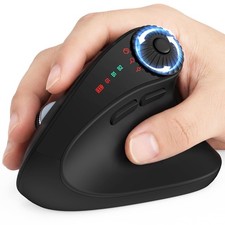
Based on ergonomic principles, the optimized 59° vertical angle guides your forearm and wrist into a natural ""handshake"" position. Specifically designed for small to medium hands, it provides full, comfortable , significantly reducing tension in the forearm pronator muscles . - Multi-Function Quick-Switch Scroll Wheel
Go beyond scrolling with an intelligent wheel that toggles between multiple modes: Standard Scroll Mode: Smoothly browse pages and documents.
Application Switch Mode: Quickly toggle horizontally between open windows, boosting multitasking efficiency.
Zoom Mode: Easily zoom in and out in applications like Photoshop, CAD, or maps.
Horizontal Scroll Mode: Navigate freely left and right in large Excel spreadsheets or wide timelines. - Intelligent Power Management for Worry-Battery Life
Features a chip that automatically enters a deep sleep state after 10 minutes of inactivity for maximum energy savings. Instantly wake it up with a double-click on any button—no lag.
Technical Specifications at a Glance
- DPI Settings: 1200 / 2400 / 3200 / 4000 (Cyclable via bottom button)
- Connectivity: 2.4GHz Wireless (USB Nano Receiver) + Bluetooth 5.0
- Ergonomic Design: 59° Vertical Angle, Right-Handed, Recommended for Small-Medium Hands
- Special Features: Multi-mode switchable scroll wheel, 10-min Auto Sleep / Double-Click Wake
- Button Durability: Micro switches for 3 million clicks
- Compatibility: Windows, macOS, Linux, Chrome OS, Android
Q1: Is this ergonomic vertical good for small hands? A: Yes. The MAM51 ergonomic is designed specifically for small to medium hands. Its contoured vertical shape helps users hold the comfortably while keeping the main buttons and thumb wheel easy to reach. Q2: Is this wireless suitable for large hands? A: The MAM51 is mainly made for small to medium hands. Users with large hands can use it, but the may feel more compact compared with a larger vertical . Q3: What hand size is this ergo best for? A: This bluetooth is best for small and medium hands. It is a good choice for users who want a compact ergonomic with a comfortable palm shape and easy button control. Q4: Does the 59° vertical design help with wrist comfort? A: The 59° vertical design supports a more natural handshake-style wrist position compared with a traditional flat . It is designed to reduce wrist twisting during everyday computer use. Q5: Can this vertical or treat carpal tunnel syndrome? A: No. This vertical ergonomic is not a device and is not intended to diagnose, treat, , or prevent any condition. Its ergonomic vertical design may help a more natural wrist posture during daily computer work. Q6: Is this laptop comfortable for long office hours? A: Yes. The MAM51 wireless mice is designed for daily office use, spreadsheets, reports, browsing, and multitasking. Its vertical shape, small-to-medium hand fit, and thumb wheel are made to comfortable and efficient workflows. Q7: How long does it take to used to a vertical ? A: Most first-time users may need a short adjustment period because the grip feels different from a flat . After regular use, the handshake-style position usually feels natural for office and productivity tasks. Q8: Is this vertical hard to use for beginners? A: No. The MAM51 computer is designed to be easy to use. It connects without a driver, uses familiar left and right buttons, and adds a thumb wheel for productivity functions such as horizontal scrolling, zooming, and app switching. Q9: What does the 3-in-1 thumb wheel do? A: The multifunction thumb wheel supports horizontal scrolling, application switching, and zoom in or out control. It is especially useful for Excel, wide spreadsheets, finance work, reports, data analysis, and multitasking. Q10: Is the thumb wheel useful for Excel? A: Yes. The thumb wheel is of the key features of the MAM51. It lets you scroll horizontally through wide Excel sheets, making it easier to review large tables, financial reports, and data-heavy documents. Q11: Can I switch between apps with this computer wireless? A: Yes. The 3-in-1 thumb wheel supports application switching, helping you move between work windows more efficiently during multitasking. Q12: Can I zoom in and out with this wireless ergonomic ? A: Yes. The multifunction thumb wheel supports zoom control, making it useful for documents, spreadsheets, pages, and detailed work. Q13: What operating systems does this vertical wireless ? A: The MAM51 wireless for laptop works with Windows, macOS, ChromeOS, and Linux. It is suitable for laptops, desktops, and . Q14: Does this bluetooth ergonomic work with MacBook? A: Yes. The MAM51 mice can connect to MacBook by Bluetooth. If you want to use the 2.4GHz USB receiver with a USB--only MacBook, a USB-adapter may be needed. Q15: Does this bluetooth work with iPad or ? A: Yes, it can work with that Bluetooth input. For USB--only , Bluetooth connection is the recommended option. Q16: Does it need a driver? A: No. The MAM51 is plug-and-play. No driver installation is required for normal use. Q17: Can it connect by Bluetooth? A: Yes. The MAM51 bluetooth supports Bluetooth wireless connection for laptops, desktops, , and other Bluetooth-enabled devices. Q18: Does it include a USB receiver? A: Yes. The MAM51 wireless vertical includes a 2.4GHz USB receiver. The receiver can be stored inside the battery compartment when not in use. Q19: Can I connect this black to more than device? A: The MAM51 ergo supports Bluetooth and 2.4GHz wireless connection options, so you can use it across different devices. For switching, connect through the desired wireless mode according to your device setup. Q20: Does it work with USB-devices? A: Yes, USB-devices can use the through Bluetooth if they Bluetooth input. The 2.4GHz receiver uses a USB-A port, so a USB-adapter may be needed for USB--only computers. Q21: Is this a rechargeable ? A: No. The MAM51 is powered by AAA batteries. It is not a built-in rechargeable .(Battery not ) Q22: Does it -charging? A: No. This model uses AAA batteries and does not -charging. Q23: How does the ergonomic save battery? A: The MAM51 ergonomic mice has an automatic sleep mode that activates after 10 minutes of inactivity to help extend battery life. Q24: What DPI levels does this Multi-Device have? A: The MAM51 Multi-Device offers 4 adjustable DPI levels: 1200, 2400, 3200, and 4000 DPI. You can choose the speed that fits your task and screen setup. Q25: Is the cursor movement accurate? A: Yes. The MAM51 computer is designed for smooth and accurate tracking for common tasks such as spreadsheets, document editing, browsing, and daily office work. Q26: Can this laptop wireless be used without a pad? A: It can track on many common desktop surfaces, such as wood desks and office tables. For best consistency, a pad is recommended on glass, reflective, uneven, or fabric surfaces. Q27: Is the wireless connection stable? A: The MAM51 wireless supports Bluetooth and 2.4GHz wireless connection for stable everyday use. For the best signal, keep the within a normal working distance and avoid strong wireless interference. Q28: Is this wireless good for travel? A: Yes. The compact shape, wireless connection options, and receiver storage inside the battery compartment make it convenient for office, home, business trips, and travel. Q29: Is the clicking sound silent? A: The provided product features do not describe this model as a silent-click . It is designed for everyday office use, but users who need an ultra-quiet should check the product details before purchase. Q30: What should I do if the USB receiver is lost? A: Please our team through . We will help check the available solution for your product and connection needs. Q31: What is the or period? A: The MAM51 usb includes product for up to 24 months after purchase. If you experience a product issue, please our responsive team through . Q32: What is this office best for? A: The MAM51 is best for office work, Excel spreadsheets, finance reports, data analysis, browsing, document editing, studying, and multitasking. It is especially suitable for users who want a compact ergonomic for small to medium hands.
【3-in-1 Thumb Wheel for Excel and Productivity:】Work faster with a multifunction thumb wheel designed for horizontal scrolling, app switching, and zoom control. Ideal for wide spreadsheets, Excel work, finance reports, data analysis, document editing, and multitasking without constantly moving your hand from the ergonomic
【59° Ergonomic Vertical for Small and Medium Hands】The MAM51 uses a 59° handshake-style angle to a more natural wrist position than a traditional flat . Its contoured shape is made for small to medium hands, offering comfortable palm , easy button access, and better control during daily office work
【Bluetooth and 2.4GHz Wireless Across Devices】 This wireless is connect by Bluetooth or the 2.4GHz USB receiver for flexible wireless use. with Windows, macOS, ChromeOS, Linux, laptops, desktops, and . No driver installation is required, making setup simple and plug-and-play
【4-Level DPI Precision Control】 The bluetooth switch between 1200, 2400, 3200, and 4000 DPI to match different tasks, from everyday browsing to fast navigation across large screens and detailed spreadsheet work. Smooth tracking helps improve control on common desktop surfaces
【Designed for Long Workdays and Easy Adjustment】The vertical grip may take a short adjustment period for first-time users, but the shape is made to feel natural for office tasks, browsing, reports, and spreadsheet work. A great choice for users who want a more comfortable for extended computer use
【24-Month Product 】 The MAM51 includes automatic sleep mode after 10 minutes of inactivity to help extend battery life. The USB receiver stores inside the battery compartment for travel. For product questions or quality-related issues, our responsive team is available through for up to 24 months after purchase