Product description
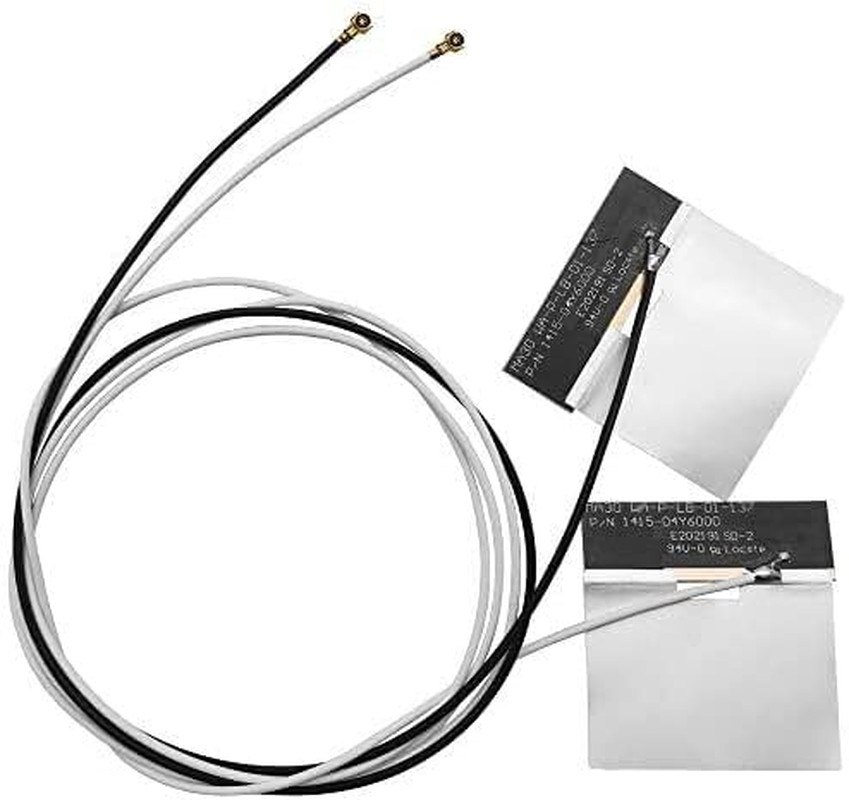
MHF4 IPEX4 WiFi 6E Antenna — Tri-Band 6GHz/5GHz/2.4GHz Internal FPC for Intel AX210/AX201/AX200, M.2 NGFF Cards, 2-Pack with Dual Cable Lengths
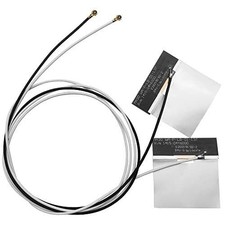
Upgrade your M.2 WiFi card with tri-band coverage. This internal FPC antenna uses the MHF4 (IPEX4) connector specifically designed for M.2 NGFF wireless cards. It supports 2.4GHz, 5GHz, and 6GHz bands for full WiFi 6E/7 compatibility.
Is your laptop or mini PC ready for the next generation of wireless connectivity? This Tri-Band MHF4 Internal FPC Antenna Kit brings full 2.4GHz, 5GHz, and 6GHz support to your M.2 WiFi 6E/7 card. Unlike traditional dual-band antennas, this tri-band design unlocks the 6GHz "fast lane" for ultra-low latency, interference-free WiFi 6E/7 performance .
Designed specifically for M.2 (NGFF) interface WiFi cards, these antennas feature the industry-standard MHF4 (IPEX 4) connector with a 1.2mm mating height . The compact FPC (Flexible Printed Circuit) design with 3M adhesive backing allows for easy internal installation in laptops, mini PCs, and compact devices .
Chipset Series Models
for Intel WiFi 6E/7 AX210, AX211, AX200, AX201, 9560, 9260
for Intel 8xxx Series 8260, 8265
for Intel 7xxx Series 7260, 7265, 3160, 3165, 3168
for Killer 16xx/15xx1675x, 1650x, 1550, 1435, 1525, 1535
for Broadcom NGFF BCM94352Z, BCM94360HMB, BCM943228ZH
for Dell DW Series DW1560, DW1830, DW1820A
IMPORTANT — READ BEFORE ORDERINGMHF4 (IPEX4) is NOT the same as U.FL (IPEX1). MHF4 is physically smaller and designed for M.2 NGFF cards. It will NOT fit Mini PCIe cards or U.FL ports. Check your WiFi card's connector type before ordering. If you see a U.FL port, this antenna will NOT work.
Compatibility:
- Intel AX210 / AX200 / AX201
- Intel 9260 / 9560 / 8265 / 8260
- Killer 1675x
- Other M.2 NGFF WiFi cards with MHF4 connectors
NOT Compatible with:
- Mini PCIe cards (use U.FL / IPEX1)
- Any device with U.FL / IPEX1 ports
- External antenna connectors (RP-SMA, SMA)
Why choose this MHF4 antenna?
- Tri-Band Coverage — 2.4GHz / 5GHz / 6GHz for WiFi 6E/7
- MHF4 Precision Connector — 1.2mm mating height, designed for M.2 NGFF cards
- FPC Adhesive Mount — Stick inside chassis, no brackets needed
- 2-Pack with Dual Cable Lengths — Flexible routing for laptop and desktop
- 3dBi Gain, 50 Ohm Impedance
Technical Specifications Frequency Bands 2.4GHz (2400-2500 MHz), 5GHz (4900-5850 MHz), 6GHz (5925-7125 MHz) Gain 3 dBi Connector Type MHF4 (IPEX 4 / Gen 4) Radiation Pattern Omnidirectional (360° coverage) VSWR ≤ 1.8 (2.4GHz), ≤ 1.5 (6GHz) Impedance 50 Ohms PCB Size Approx. 2 x 0.35 inches Cable Length (Gray) 48 cm (18.8 inches) Cable Length (Black) 66 cm (25.9 inches) Operating Temp -40°C to +85°C Interface M.2 (NGFF) ONLY – NOT Mini PCIe Installation Guide:(IMPORTANT: The MHF4 connector is delicate. Please read these instructions carefully.)
Step 1: Power Off Your Device – Turn off your laptop or mini PC and disconnect the power adapter.
Step 2: Access the M.2 Card – Remove the bottom cover of your laptop or open your mini PC to access the M.2 WiFi card.
Step 3: Remove Old Antennas – Gently disconnect the old antenna cables from the M.2 card by lifting the connector housing straight up with tweezers – never pull by the wire.
Step 4: Connect New Antennas – Align the MHF4 connector straight (90°) over the terminal on your M.2 card. Press straight down with light, even pressure until you feel a slight CLICK .
Step 5: Route and Secure – Route the cables inside your device chassis. Peel the adhesive backing and secure the FPC antennas to a non-conductive surface away from metal components
Step 6: Reassemble and Test – Close your device, power it on, and test your WiFi connection.
CRITICAL SAFETY WARNING: Never connect or disconnect an antenna with the device powered on. Operating a wireless card without an antenna can permanently damage the radio amplifier.
CHECK YOUR CARD BEFORE ORDERING
Visual: A three-panel infographic:
- Panel 1 (Compatible): M.2 (NGFF) card with U.FL/MHF4 port – “M.2 NGFF Card – COMPATIBLE”
- Panel 2 (NOT Compatible): Mini PCIe card – “Mini PCIe Card – NOT COMPATIBLE”
- Panel 3 (NOT Compatible): Older IPEX 1/2/3 connector – “Older IPEX 1/2/3 – NOT COMPATIBLE”
Text: This antenna uses the MHF4 (IPEX 4) connector. It is designed for M.2 (NGFF) interface cards ONLY . It will NOT work with Mini PCIe cards or older IPEX 1/2/3 connectors .
Title: Why the 6GHz Band is a Game-Changer
Text: Traditional WiFi networks (2.4GHz and 5GHz) are often congested with legacy devices, smart home gadgets, and neighboring networks. The 6GHz band provides exclusive, interference-free spectrum for next-generation WiFi 6E/7 devices.
Title: Compatible with Major WiFi 6E/6/5 M.2 Cards
WiFi Cards (M.2 NGFF with MHF4 Connector):
- for Intel AX210 / AX211 / AX200 / AX201 – WiFi 6E/6
- for Intel 9560 / 9260 / 8260 / 8265
- for Intel 7260 / 7265 / 3160 / 3165 / 3168
- for Killer 1675x / 1650x / 1550 / 1435 / 1525 / 1535
- for Broadcom BCM94352Z, BCM94360HMB, BCM943228ZH
- for Dell DW1560, DW1830, DW1820A
NOT Compatible:
- for Mini PCIe cards
- for Older IPEX 1/2/3 connectors
- for Intel 7265D2W, 8260D2W
HOW TO INSTALL YOUR MHF4 ANTENNA – READ BEFORE USE
Visual Layout: 4-panel infographic
StepAction
1Locate M.2 Card – Open your device and find the M.2 WiFi card. Identify the MHF4 ports.
2Remove Old Antennas – Gently lift the connector housing straight up with tweezers – never pull by the wire.
3Connect New Antennas – Align MHF4 connector straight (90°) over the terminal. Press straight down until you feel a CLICK .
4Secure and Route – Use 3M adhesive backing to place FPC antennas away from metal components .
Important Warnings:
- Do NOT insert at an angle – may damage the connector
- Do NOT pull by the wire – use tweezers on the connector housing
- Do NOT force the connector – if it doesn't click, check alignment
- Must be used with M.2 (NGFF) interface cards – NOT Mini PCIe
- 2x Tri-Band MHF4 (IPEX 4) Internal FPC Antennas (2.4/5/6GHz, 3dBi)
- 🔹 TRUE TRI-BAND COVERAGE – 2.4GHz / 5GHz / 6GHz WIFI 6E/7 READY – This internal FPC antenna supports all three frequency bands: 2.4GHz (2400-2500 MHz) for long-range coverage, 5GHz (5150-5850 MHz) for high-speed streaming, and 6GHz (5925-7125 MHz) for ultra-low latency WiFi 6E/7 performance. Frequency coverage: DC up to 7.125 GHz with low VSWR .
- 🔹 MHF4 (IPEX 4) PRECISION CONNECTOR – FOR M.2 NGFF CARDS – Features the industry-standard MHF4 (IPEX 4) connector (1.2mm mating height), specifically designed for modern M.2 (NGFF) WiFi cards . ⚠️ CRITICAL: This is for M.2 (NGFF) interface ONLY – NOT compatible with Mini PCIe cards or older IPEX 1/2/3 connectors. Compatible with Intel AX210, AX211, AX200, AX201, 9560, 9260, Killer 1675x/1650x/1550, and most M.2 NGFF WiFi cards .
- 🔹 FLEXIBLE PCB (FPC) ADHESIVE DESIGN – EASY INTERNAL INSTALLATION – The flexible printed circuit (FPC) antenna features a 3M adhesive backing for secure, permanent mounting inside RF-transparent (plastic) enclosures . The ultra-thin, flexible design fits easily inside laptops, mini PCs, and compact devices without taking up valuable space .
- 🔹 3DBI GAIN & OMNIDIRECTIONAL PERFORMANCE – Delivers 3 dBi gain with an omnidirectional radiation pattern for balanced 360° coverage . VSWR ≤ 1.8 for 2.4GHz band, ≤ 1.5 for 6GHz band ensures efficient power transfer and minimal signal reflection . Frequency range: 2400-7125 MHz .
- 🔹 DUAL CABLE LENGTHS – FLEXIBLE ROUTING – Includes two different cable lengths for flexible installation inside various chassis: Gray/White Cable: 56 cm (22 inches) Black Cable: 66 cm (25.9 inches) The adhesive backing allows for easy placement inside your device chassis.
- 🔹 WIDE COMPATIBILITY – SUPPORTS MAJOR WIFI 6E/7 CARDS – Compatible with M.2 (NGFF) interface cards including: Intel AX210, AX211, AX200, AX201, 9260, 9560, 8260, 8265, 7260, 7265 Killer 1675x, 1650x, 1550, 1435, 1525, 1535 Broadcom NGFF series, Dell DW series Most M.2 WiFi 6/6E/7 cards with MHF4 connector
- 🔹 ⚠️ CRITICAL INSTALLATION TIPS – The MHF4 connector is very delicate and must be handled with care : Align straight (90°) over the port – do NOT insert at an angle Press straight down with light, even pressure until you feel a slight click DO NOT wiggle or pull by the wire – use tweezers to lift the connector housing straight up if disconnecting IMPORTANT: This antenna is for M.2 (NGFF) interface ONLY – will NOT work with Mini PCIe cards
- 🔹 KIT INCLUDES – 2x Tri-Band MHF4 (IPEX 4) Internal FPC Antennas (1x Gray/White Cable, 1x Black Cable)