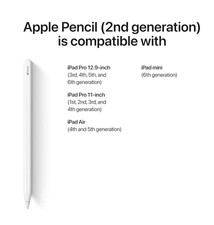
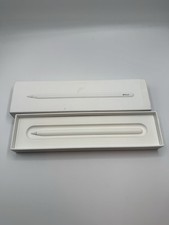
The Apple Pencil Pro works only with newer iPads that support the latest magnetic charging and advanced features like squeeze gestures, barrel roll, and Find My.
Here are the compatible iPad models:
- iPad Pro 13-inch (M4 and M5)
- iPad Pro 11-inch (M4 and M5)
- iPad Air 13-inch (M2, M3, and M4)
- iPad Air 11-inch (M2, M3, and M4)
- iPad mini (A17 Pro)
Important:
- It does NOT work with older iPad Pro models (M2, M1, or earlier).
- It does NOT work with standard iPads like the 10th gen or A16 iPad.
✔️ 100% Battery Health
✔️ Excellent / Like-New Cosmetics
✔️ Free & Fast U.S. Shipping
✔️ Trusted U.S. Seller
Product Description
Apple Pencil Pro adds even more magical capabilities to help bring your ideas to life. New advanced features make marking up, taking notes, and creating a masterpiece more intuitive than ever. Squeeze. Apple Pencil Pro can sense when you squeeze it and brings up a new palette so you can quickly switch tools, line weights, and colors, thanks to a new sensor. Barrel roll. A new gyroscope allows you to rotate the Apple Pencil Pro for precise control of shaped pen and brush tools. Haptic response. A custom haptic engine provides response that you can feel. When you squeeze or double-tap, a light pulse confirms the action. Apple Pencil hover. Preview exactly where your Apple Pencil will touch down on your display. So you can write, sketch, and illustrate with even greater precision. Double-tap.
Package Contents
Warranty
Return PolicyIf you are not 100% satisfied with your purchase and/or if the item(s) received do not match the description provided, you can return your order for a full refund or replacement within 30 days from the date of purchase.Customer ServiceIf you have any questions about an item, our policies or need help placing an order feel free to contact us.
🛡️Warranty Coverage
Backed by1-Year Allstate Warranty.
If your item breaks or malfunctions, you’re protected with repair, replacement, or reimbursement options.
More info: Refurbished Warranty Program.
📦Packaging & Quality Control
Devices aretested, cleaned, and gradedbefore shipping.
Securely packaged to ensure safe delivery.
Quality Control Approved & Labeled– All IMEIs recorded for security.
📌Included Accessories
🚚Shipping & Handling
Handling Time: Orders ship within24 hoursof payment clearance (Mon–Fri).
Orders placed by9:00 AM CSTusually ship the same day.
Delivery Time: 2–3 business days after dispatch.
Expedited shipping options available at checkout.
High-value items may require asignature upon delivery.
No PO Box Shipping– Please provide a physical residential or business address.
💳Payments
🔄Returns & Replacements
Start a return viaMy > Purchase History > Return Item.
You may upload up to 10 photos to document condition.
A prepaid return shipping label will be provided within24–48 hours.
Returns are processed within24–48 hoursof receipt (excluding Offered based on stock availability. Please include a note if requesting a replacement.
Important: Remove any iCloud, Google, or Samsung accounts before returning. Failure to do so may result in restocking fees.
🔑Account Removal Instructions
iCloud (Apple)
Go toiCloud.com→ Sign in.
OpenFind My iPhone→ SelectAll Devices.
Select the device → Click the small“x”to remove.
⚠️Do not erase the device—remove it properly so it can be reused.
Google Account (Android)
OpenSettings > Passwords & Accounts.
Select the account →Remove Account.
Confirm with your device PIN, password, or pattern.
Samsung Account
Go toSettings > Accounts and Backup > Manage Accounts.
Select your Samsung account →Remove Account.
Enter your password and sign out.
🔄Device Reset Instructions
iPhone Hard Reset
Press & releaseVolume Up.
Press & releaseVolume Down.
Press & holdSide Buttonuntil Apple logo appears.
Android Factory Reset
Go toSettings > General Management > Reset.
SelectFactory Data Reset.
Confirm and reset device.
⌚Apple Watch Pairing Guide
Press & hold theside buttonon your Apple Watch until the Apple logo appears.
Hold your iPhone near the Apple Watch.
TapContinueon your iPhone → Set Up for Myself.
If pairing doesn’t start, open theWatch App→ Start Pairing.
Use your iPhone camera to scan the Apple Watch screen.
📩Contact Us
We’re here to help! Please contact us via Messages:
Go toMy > Purchase History.
Find your order → SelectMore Actions > Contact Seller.
Send us a message.
⏱️Response Time: Within24 hours on weekdays.
Thank you for choosingTech4C LLC– We appreciate your business!